Fractional CFOs
Refresh forecasts across client engagements without rebuilding each model.
 Request a Demo
Monthly forecasting, without the monthly rebuild
ForecastBridge gives finance teams a structured, repeatable monthly process that preserves prior work, carries assumptions forward, and generates a fully editable, CFO-ready Excel workbook.
Built for fractional CFOs, controllers, and finance consultants
Who ForecastBridge is for
Refresh forecasts across client engagements without rebuilding each model.
Deliver a consistent, reviewable forecasting process for every client.
Connect the monthly close directly to an updated operating forecast.
Turn summarized GL actuals into a structured, decision-ready forecast.
Gain professional cash visibility without implementing enterprise FP&A software.
Why it exists
ForecastBridge is the practical middle ground between rebuilding spreadsheets by hand and implementing a full enterprise FP&A platform.
Spreadsheet forecasts require repeated imports, formula checks, assumption updates, and formatting every month.
When updates take too long, teams keep using assumptions that no longer reflect the business.
Many smaller organizations need disciplined forecasting without a lengthy implementation or enterprise software footprint.
The monthly workflow
ForecastBridge preserves prior work and standardizes the monthly forecasting process so each update focuses on the decisions that need attention.
Bring in the latest summarized general ledger results.
Confirm that financial accounts flow to the right forecast categories.
Use historical results as the starting point for forward expectations.
Change only the monthly assumptions that should move.
Include financing, capital expenditures, taxes, or other one-time items.
Create a refreshed view of revenue, cash, and runway.
Deliver a transparent, CFO-ready model for review and presentation.
Why ForecastBridge
Carry prior planning forward, then focus on what changed after the close.
See ending cash, minimum cash, runway, and known cash events in one forecast.
Review transparent formulas, edit assumptions, and share a workbook finance professionals understand.
Follow the same structured operating-forecast workflow after every close.
Test alternative assumptions without changing the approved base forecast.
Reduce repetitive spreadsheet work and the opportunity for copy, formula, and version-control errors.
Inside ForecastBridge
See the monthly workflow in the application, then open the finished Excel workbook for a closer look.
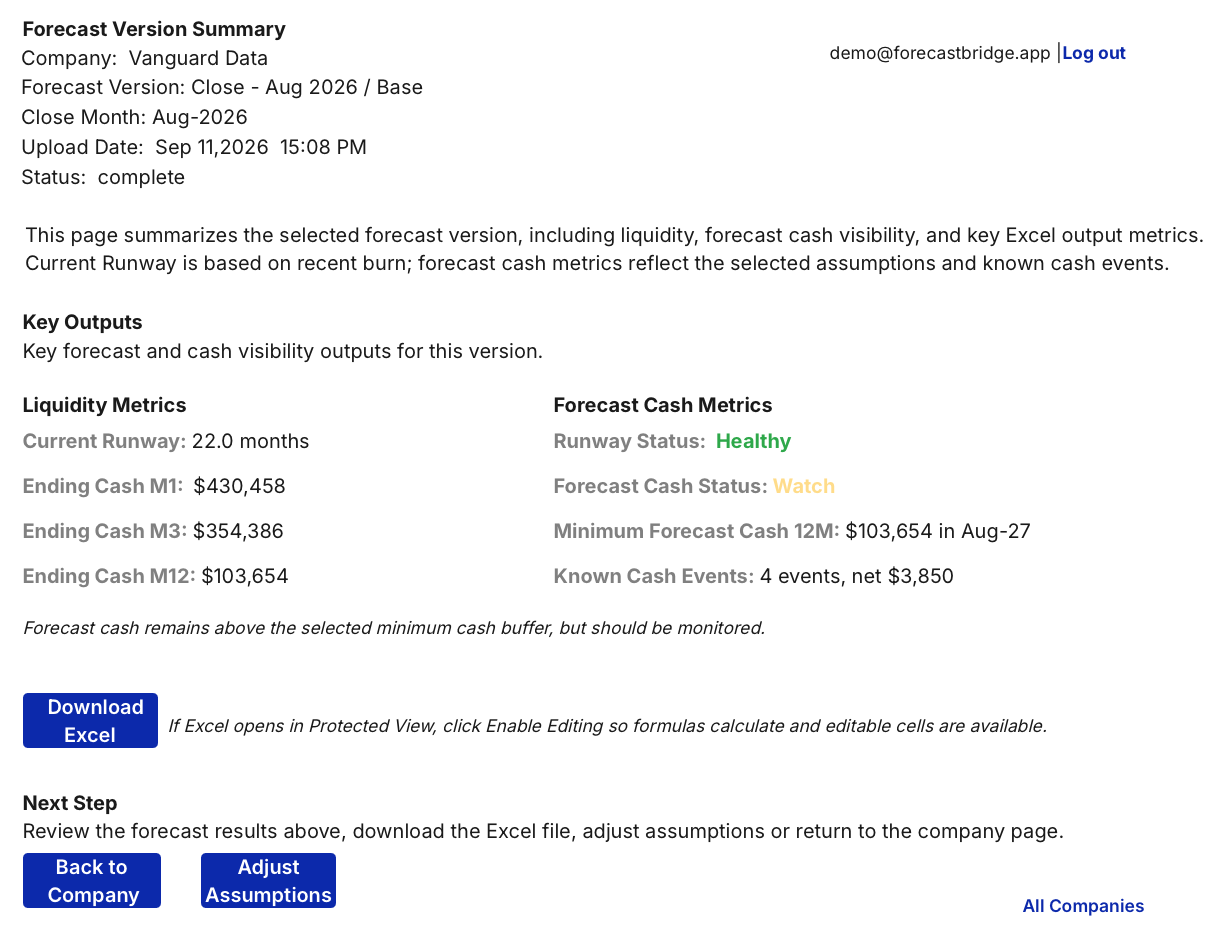
Review executive cash, runway, status, and known cash events at a glance.
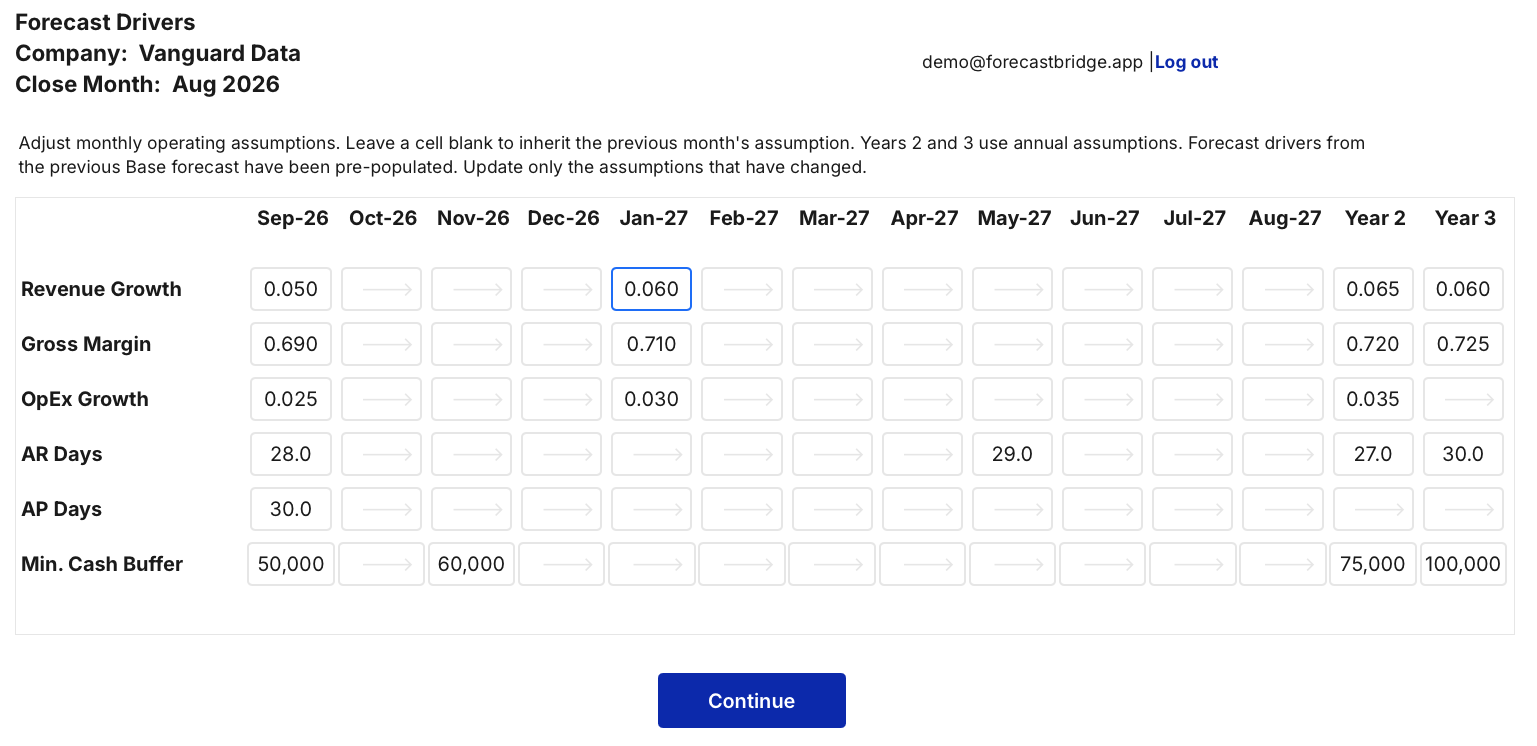
Update only the assumptions that changed while prior inputs carry forward.
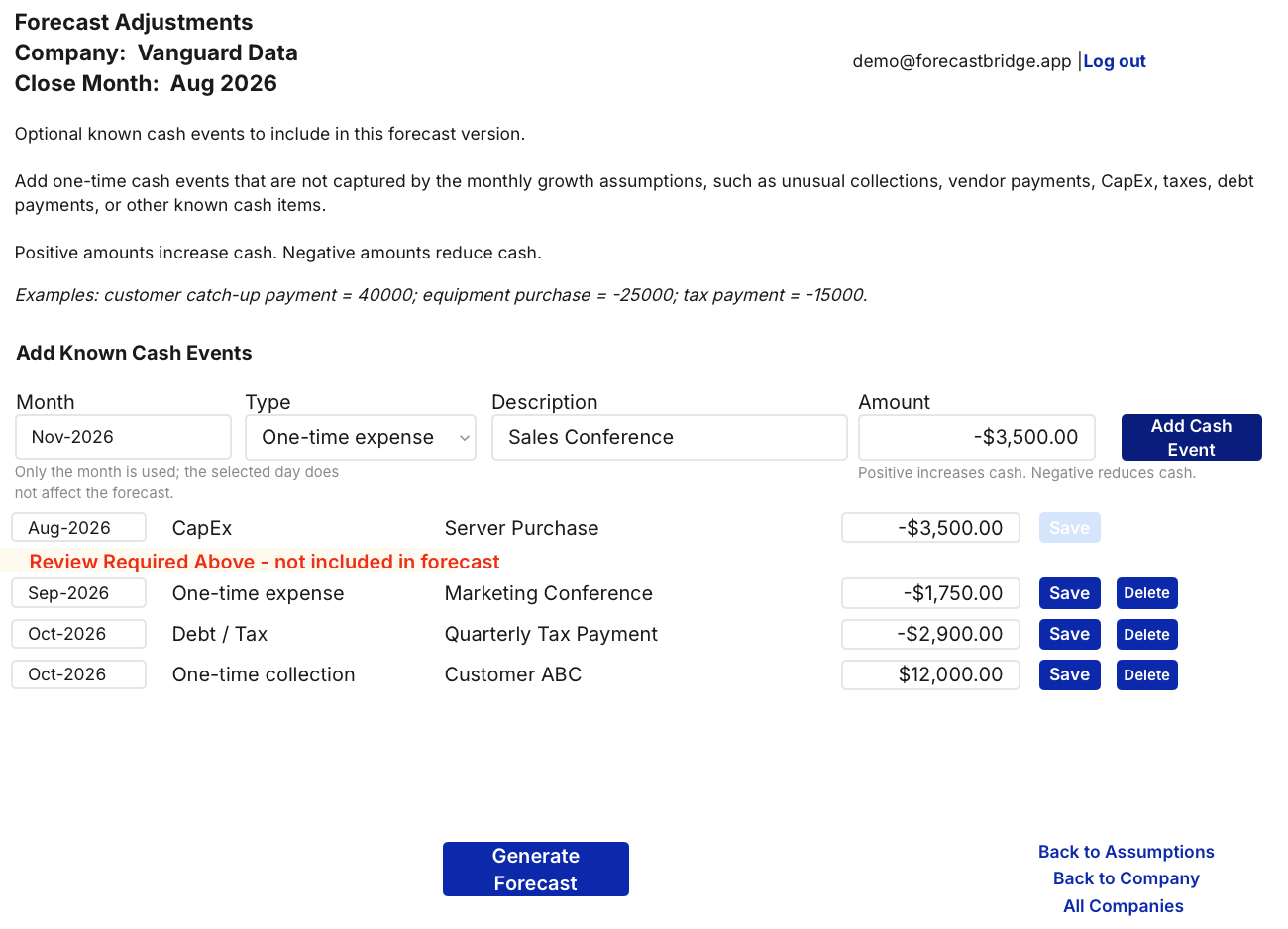
Plan one-time collections, investments, taxes, and other known cash items.
Open the workbook preview and switch among Output, Cash, Overview, and Forecast Drivers without leaving the page.
Product overview
Watch the complete monthly workflow—from updated GL actuals through the final CFO-ready Excel workbook.
Created by a CFO. Refined through operations.
Founder • Former CFO & COO • 25+ Years Leading Finance & Operations
After more than 25 years leading finance and operations for growing companies, I noticed the same pattern every month. The close would finish, and then someone had to rebuild the operating forecast from the latest GL actuals.
The work wasn't creating better decisions—it was recreating spreadsheets, updating assumptions, checking formulas, and making sure nothing broke.
I built ForecastBridge to change that.
Instead of starting over every month, ForecastBridge preserves prior work, carries assumptions forward, updates only what changed, and generates a transparent, CFO-ready Excel workbook your team can review, edit, and share with confidence.
Because forecasting should help you think about the business—not spend another day rebuilding the model.
Connect with Jim on LinkedInEarly Access
We're working with a limited group of finance professionals to continue shaping ForecastBridge. If you're a CFO, Controller, Accountant, Finance Consultant, or Business Owner interested in influencing future features, we'd love to hear from you.
Frequently asked questions
ForecastBridge is built for fractional CFOs, finance consultants, controllers, accountants, and business owners who update operating forecasts after each monthly close.
No. ForecastBridge speeds up the monthly process and produces a transparent, fully editable Excel workbook for review, analysis, and presentation.
No. It provides a practical middle ground for organizations that need disciplined operating and cash forecasting without a lengthy enterprise implementation.
Yes. Consultants can use the same repeatable workflow across multiple clients while keeping each company's data, mappings, assumptions, and forecasts separate.
Once account mappings and assumptions are established, a typical monthly update can be completed in minutes. Timing varies with the complexity and number of changes.
Most users can begin generating forecasts after their initial account mappings and assumptions are configured. Monthly updates then take only minutes.
See ForecastBridge in action
Request a demo to see how ForecastBridge turns your latest GL actuals into a repeatable operating forecast and CFO-ready workbook.
Questions? demo@forecastbridge.app